
Bible passages are one of the most frequently displayed forms of content during a church service. A pastor may reference several chapters during a sermon, a worship leader may include Scripture between songs, or a church may use Bible verses as part of prayer, communion, or special services. When the congregation relies on a screen to follow the text, the presentation system needs to make Scripture easy to find, read, and display.
That is why choosing the right Bible presentation software involves more than comparing a list of technical features. The software needs to fit the way a church prepares services, manages Scripture, operates live presentations, and handles last-minute changes.
A good solution should reduce the amount of work required from volunteers while improving accuracy and readability. It should also work as part of a broader church media workflow rather than functioning as an isolated tool.
What Bible Presentation Software Actually Needs to Do
At its simplest, Bible presentation software allows a church to display Scripture on a projector, television, LED wall, or other presentation screen.
However, a practical church setup often requires considerably more.
The media team may need to:
- Search for a specific Bible passage
- Select the correct translation
- Display individual verses or ranges
- Adjust text formatting
- Move between passages quickly
- Add Scripture to a service sequence
- Combine Bible verses with worship lyrics
- Prepare sermon content in advance
- Operate everything during a live service
The best software therefore supports both content preparation and live presentation.
A volunteer should be able to prepare a sermon presentation without spending hours manually formatting every verse. During the service, the operator should be able to find the next passage without interrupting the speaker’s flow.
Start With Your Church’s Actual Workflow
Before comparing software products, document how your church currently presents Scripture.
Ask a few practical questions.
How are Bible passages currently prepared?
Are verses copied manually from websites?
Does someone type them into presentation slides?
Does the church use a separate program for worship lyrics?
Does the pastor send references through email or messaging?
Does the media volunteer receive sermon information several days before Sunday?
How often are last-minute Scripture changes made?
The answers reveal which features matter most.
For example, a church that manually copies every verse into presentation slides may benefit significantly from integrated Bible search and passage formatting.
A church that already has an efficient system may care more about fast live navigation, multiple displays, or integration with its existing service workflow.
Technology should solve an existing problem rather than create another layer of complexity.
Check Bible Translation Support First
Bible translation support is one of the first things to verify.
A church may have a preferred translation for sermons and public Scripture reading. If the software does not support that translation, the media team may still have to copy text manually.
That creates additional work and increases the possibility of errors.
Before selecting a platform, determine which translations your church regularly uses.
Consider:
- Primary translation
- Secondary translations
- Language requirements
- Public reading preferences
- Sermon preparation habits
- Copyright or licensing requirements
Do not assume that every Bible presentation platform includes every translation.
The exact availability of Bible versions can vary by software and region, so churches should verify current support before making a purchasing decision.
Look for Fast Scripture Search
During a live sermon, speed matters.
Imagine a pastor suddenly says:
“Let’s look at Isaiah 41:10.”
The presentation operator should not need to search through dozens of slides or open a browser and copy the verse.
A dedicated Bible presentation system can make this process much faster.
The operator should ideally be able to search by:
- Book
- Chapter
- Verse
- Passage range
The interface should also make it obvious which result is being selected.
This is particularly useful when the pastor references several passages in quick succession.
A search feature may seem like a small convenience, but during a live service it can save valuable seconds and reduce presentation errors.
Evaluate How Scripture Looks on the Screen
Finding a Bible passage is only half the task.
The text must also be readable.
When evaluating church presentation software, test how it handles:
- Font size
- Line spacing
- Text alignment
- Verse numbers
- Passage references
- Backgrounds
- Text contrast
- Long passages
- Multiple verses
Do not evaluate readability only on a laptop screen.
The final test should happen on the actual church display.
A passage that looks comfortable on a 15-inch monitor may be difficult to read when projected onto a large screen from a significant distance.
The software should make it easy to adjust presentation formatting without manually redesigning every Scripture slide.
Avoid Overloading Bible Slides
More content on a slide does not necessarily mean a better presentation.
If a pastor wants to display twelve verses, placing all twelve on one screen may technically accomplish the task while making the text too small to read.
Good Bible presentation software should allow a passage to be divided into manageable sections.
For example:
Psalm 23:1–3
followed by:
Psalm 23:4–6
This approach gives the congregation enough time to read without forcing the operator to reduce the font to an uncomfortable size.
The software should support the church’s presentation strategy rather than forcing every passage into the same layout.
Consider How the Software Handles Worship Lyrics
Bible presentation rarely exists independently from the rest of a Sunday service.
The same computer may be used for:
- Worship lyrics
- Bible verses
- Sermon points
- Announcements
- Videos
- Prayer slides
- Offering information
Using completely separate systems for each content type can make the operator’s job harder.
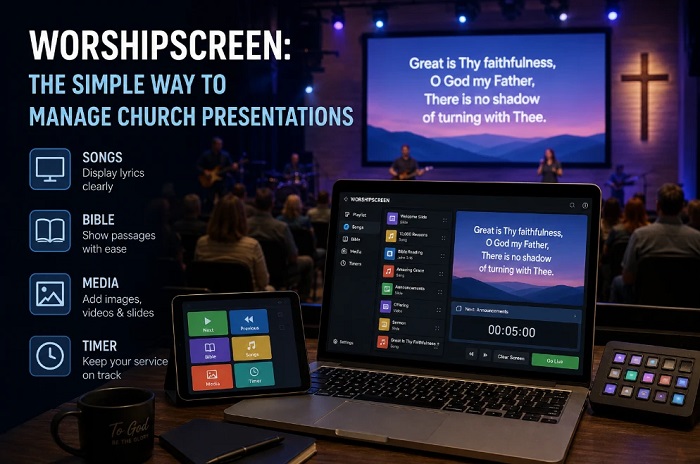
If the church also needs worship presentation software, it can be useful to consider a platform that handles Scripture and worship content within the same workflow. For example, worship presentation software can be evaluated as part of a broader approach where lyrics, Bible passages, and service content are managed from one presentation environment.
The advantage is not simply having more features. The real benefit is reducing the number of tools volunteers have to learn and operate.
Make Sure Volunteers Can Learn It Quickly
Church media teams often depend on volunteers.
This changes the software requirements considerably.
A system designed for professional broadcast operators may offer impressive capabilities but still be a poor choice if a new volunteer needs several weeks of training before they can safely operate it.
A useful interface should make common actions obvious.
A new operator should be able to understand:
- Where the service order is located
- How to display a Bible passage
- How to move forward
- How to move backward
- How to switch between content
- How to recover from a mistake
Advanced features can be valuable, but they should not make basic operations unnecessarily complicated.
A church should evaluate software from the perspective of the person who will actually run it on Sunday morning.
Check Support for Multiple Screens
Some churches use a single projector.
Others have:
- Main sanctuary screens
- Confidence monitors
- Stage displays
- Lobby screens
- Overflow room displays
- Streaming outputs
If your church uses multiple displays, determine how the software handles them.
A presentation system may need to send different content to different destinations.
For example, the congregation might see Bible verses while a confidence monitor displays worship lyrics or operator information.
Not every church needs this functionality, but it is worth considering before choosing a platform that may later become difficult to expand.
Think About Offline Reliability
Internet access should not be treated as guaranteed during a live service.
A temporary network problem should not prevent the congregation from seeing Scripture.
When evaluating Bible presentation software, determine which functions require an internet connection and which content can be stored or accessed locally.
This matters particularly for:
- Bible passages
- Worship lyrics
- Images
- Videos
- Service schedules
- Presentation assets
If critical content depends entirely on an online connection, the church should understand what happens when the network fails.
Reliable church technology should continue functioning when ordinary infrastructure experiences a temporary problem.
Check How Easy It Is to Prepare a Sunday Service
A good software system should make preparation easier, not simply improve the final appearance.
A typical Sunday workflow might look like this:
Monday or Tuesday: sermon topic and worship plan become available.
Wednesday: Bible references and song list are collected.
Thursday: media content is reviewed.
Friday: the complete service presentation is assembled.
Saturday: final changes are checked.
Sunday: the presentation is tested and operated live.
The software should fit naturally into this process.
If preparing one service requires repeatedly copying information between several applications, the media team will eventually encounter unnecessary errors.
Look at Live Navigation
Live operation is different from preparation.
During preparation, the operator has time to organize everything carefully.
During the sermon, they may have only a few seconds to respond to an unexpected reference.
This means navigation speed matters.
A good interface should make it easy to:
- Jump to a specific passage
- Move backward
- Skip content
- Return to a previous verse
- Select another Bible passage
- Recover after an accidental click
The operator should feel in control rather than afraid of making a mistake.
Verify How the Software Handles Long Passages
Some Scripture references are short.
Others are not.
A pastor may ask the congregation to read an entire section of a chapter, particularly during teaching series, Bible studies, communion services, or special events.
Test the software with both short and long passages.
Look for:
- Automatic text fitting
- Sensible pagination
- Verse numbering
- Consistent formatting
- Easy navigation between pages
- Reference visibility
Automatic fitting can be helpful, but it should not simply shrink the text until everything fits.
Readability should remain the priority.
Consider Search and Presentation Separately
An excellent Scripture search tool does not automatically guarantee an excellent presentation system.
These are two different requirements.
Search answers:
“Can the operator find the passage quickly?”
Presentation answers:
“Can the congregation read the passage comfortably?”
A church should test both.
A platform may retrieve a passage instantly but display it with poor spacing. Another system may create beautiful slides but make Scripture difficult to locate.
The ideal solution handles both parts of the workflow effectively.
Test the Software With a Real Sermon
A product demonstration can be useful, but a real sermon scenario is better.
Choose an upcoming sermon and prepare it using the software.
Include:
- Several Bible passages
- A long passage
- A short verse
- A repeated reference
- A transition between sermon points
- At least one last-minute change
Then ask a volunteer to operate the presentation.
Watch what happens.
Does the operator know where to click?
Can they find a passage quickly?
Does the congregation-facing display remain clean?
Can the volunteer recover from a mistake?
This practical test often reveals usability problems that are not obvious from a feature list.
Think About the Cost of Complexity
Software cost is not limited to the purchase price.
A complicated system can also consume:
- Volunteer training time
- Preparation time
- Technical support time
- Troubleshooting time
- Setup time
- Maintenance effort
A cheaper platform may become expensive in practice if every Sunday requires complicated manual work.
Conversely, an advanced system may be unnecessary for a small church that only needs lyrics and Bible passages.
The right choice is the system that provides the required capabilities without introducing unnecessary operational overhead.
Build a Consistent Scripture Design
Once the software is selected, establish a standard Bible presentation style.
Define:
- Primary font
- Font size range
- Text alignment
- Reference placement
- Background treatment
- Contrast rules
- Verse number style
- Maximum text per screen
This gives the congregation a predictable visual experience.
It also makes preparation faster because volunteers are not designing each passage from scratch.
A template can be especially useful when several people contribute to church media.
Keep the Operator’s View Simple
The congregation should see a clean presentation.
The operator, however, needs access to additional information.
A useful workflow separates what the audience sees from what the operator needs to know.
Operator notes might include:
Next: John 3:16
Wait for pastor
Return to previous passage
Skip announcement
These instructions should not accidentally appear on the main screen.
A clear separation between operator controls and audience content reduces live presentation mistakes.
Make Accuracy Part of the Workflow
Bible presentation requires a final accuracy check.
Before Sunday, compare the displayed passage against the approved source.
Check:
- Book name
- Chapter
- Verse numbers
- Translation
- Wording
- Punctuation where relevant
- Passage order
Do not assume that copied content is automatically correct.
This check becomes especially important when Scripture is entered manually or when the pastor has changed the sermon shortly before the service.
Choose Software That Can Grow With the Church
A church’s technology requirements may change.
A congregation that currently uses one projector may eventually add a second screen. A volunteer media team may eventually begin livestreaming. A church that only displays lyrics may later need sermon graphics, Bible presentation, videos, and additional service content.
The software does not need to support every possible future feature, but it should not create unnecessary limitations.
Look for a platform that can handle the church’s current needs while leaving reasonable room for growth.
A Practical Selection Test
Before committing to Bible presentation software, test it against five basic scenarios:
Scenario 1: Simple verse
Can a volunteer find and display a single verse quickly?
Scenario 2: Long passage
Can the software display a longer passage without making the text unreadable?
Scenario 3: Multiple references
Can the operator move between several passages during a sermon without confusion?
Scenario 4: Last-minute change
Can a new Scripture reference be added shortly before the service?
Scenario 5: Live mistake
Can the operator recover quickly if the wrong passage is displayed?
If a system performs well in these situations, it is much more likely to work effectively in a real Sunday service.
The best Bible presentation setup is ultimately the one that combines Scripture accuracy, readable design, fast navigation, reliable operation, and a workflow that volunteers can actually maintain. When the software supports those priorities, the screen becomes a useful extension of the sermon rather than another technical responsibility competing for attention.